A website redesign can make a business look current and convert better, and it can also wipe out the search traffic the old site earned. That usually is not because Google "resets" a new design. It is because URLs change without redirects, titles and content disappear, or the new site is harder to crawl than the one it replaced. A website redesign SEO checklist exists to stop those unforced errors.
This is a practical sequence you can follow before anyone opens a design file, and again on launch day. It is written for small businesses and the studios that rebuild their sites, not for enterprise migrations with a hundred thousand pages. If you are still deciding whether a rebuild is needed, start with the signs your website needs a redesign.
Start with an inventory, not a mood board
Before colours and typography, export a list of the URLs that already exist and matter. You want:
- Every indexable page: home, services, locations, blog posts, landing pages, and any FAQ or resource pages that attract visits
- The title, heading and a short note on what each page is about
- Traffic and search queries for the last six to twelve months, from Google Analytics or your other analytics tool, and from Google Search Console if you have it
- A simple status: keep as-is, keep but improve, merge into another page, or retire
Search Console's list of pages that get impressions is more useful than guessing. Pages with little traffic can still be useful if they target a service you sell. What you should not do is delete a URL that quietly sends enquiries just because it looks dated.
Save a spreadsheet. That file becomes the source of truth for redirects, content moves and the launch check. Design can proceed in parallel, but it should not invent a new sitemap that ignores this list.
URLs and redirects are the highest-stakes work
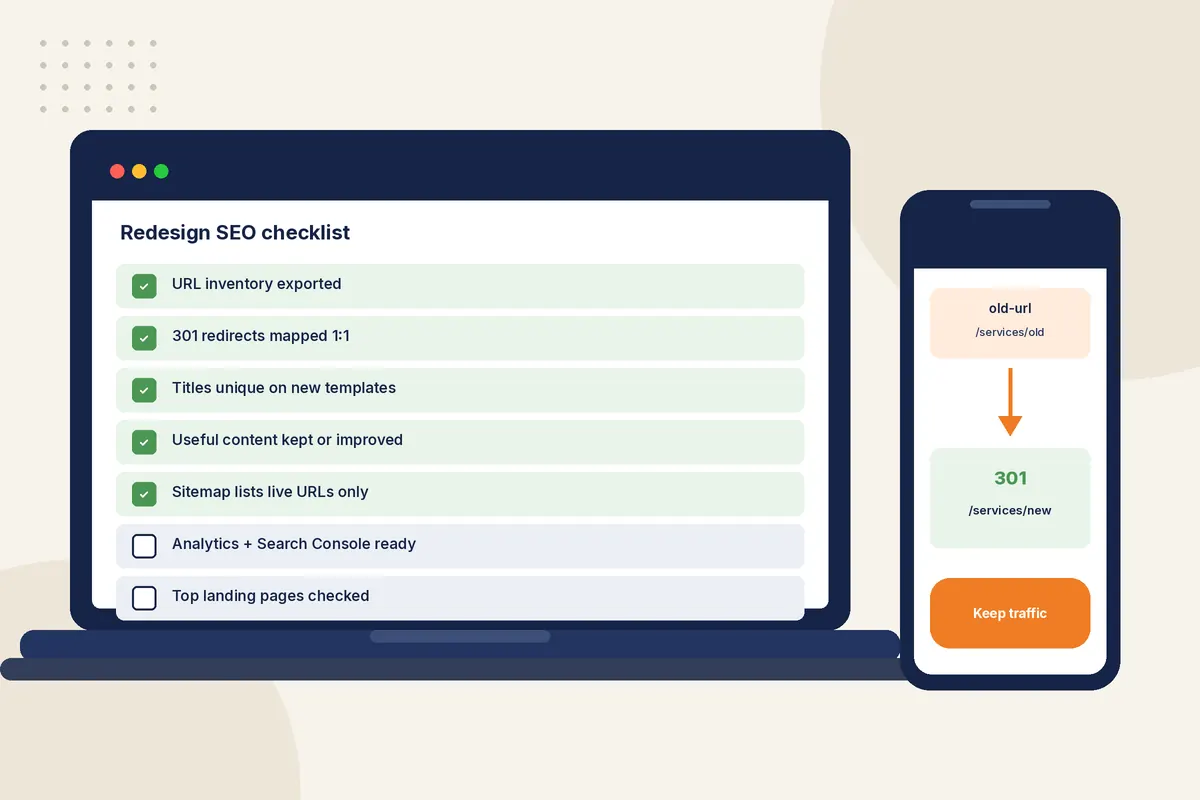
If a useful page changes address, Google and anyone who bookmarked it need a permanent (301) redirect from the old URL to the single new URL that replaces it. Google's own guidance on redirects and Google Search is worth reading once: one hop, same language and intent, no chains, and no temporary redirects used as a shortcut for a move that is meant to be permanent.
Practical rules for a small site:
- Keep a URL if the page still covers the same topic and the address is clean. Familiar URLs are an asset.
- If you must change a slug, map it one-to-one in the spreadsheet and test the redirect on the staging site.
- Never send a cluster of old service pages to the homepage. That looks convenient and wastes the meaning of each page.
- Retire a page only when you are sure nothing important links to it, or when you have a closer replacement.
- Plan www versus non-www, and trailing slashes, so you do not create duplicate versions of the same page.
If the redesign also changes domain or moves from a website builder URL to your own domain, treat that as a migration: same redirect discipline, plus updates to Search Console, analytics and any ads that point at old addresses.
Titles, descriptions, headings and canonicals
Copy the current title tags and meta descriptions into the inventory. On the new templates, make sure each important page still has a unique title that names the service or topic, and a description that a person would want to click. It is easy for a new theme to stamp the same default title across every page, or to truncate titles badly.
Check that:
- The main heading on each page still matches what the page is about
- Canonical tags, if you use them, point at the live preferred URL, not a staging domain
- Open Graph titles and images are set, so links shared on social media do not show a leftover template name
You do not need to freeze every old wording. You do need to avoid accidental blanks and duplicates.
Content: improve it, do not throw it away
Redesigns often shrink long pages into a few lines of marketing language. If a service page ranked because it explained a process, answered objections and named the areas you cover, a short slogan will not do the same job. Merge thin pages if they overlap, but keep the useful paragraphs, lists and FAQs, then tighten them.
Blog posts deserve a decision, not a blanket "we'll add a blog later". If a post still helps customers, move it, fix its heading structure, and keep the URL if you can. If it is outdated, update it or redirect it to a better page. Leaving a blog offline for months is a common way to lose long-tail traffic.
Images should be compressed and given descriptive alt text. A new visual design that ships multi-megabyte photo files will feel slower than the "old-looking" site it replaced, and Google's Core Web Vitals guidance still treats a reasonably fast main-content load as part of a good page.
Technical checks before you go live
On the staging site, or on a pre-launch copy, work through the unglamorous list:
- Staging should be noindex until you are ready; the live site should be indexable when you launch
- robots.txt must not block important pages or the live sitemap
- The XML sitemap lists only live, canonical, indexable URLs, and is referenced in robots.txt
- Forms, click-to-call links and key buttons work on a phone
- There is no leftover test content, lorem ipsum or "coming soon" service pages you did not mean to publish
- Structured data (Organization, article, FAQ if you use it) validates and does not describe a different company or a staging URL
- HTTP pages redirect to HTTPS, and any old /public or duplicate paths redirect cleanly if those existed before
If you use a new CMS, confirm that pagination, tag pages and search-result pages are handled deliberately, so you do not suddenly create hundreds of thin URLs.
Analytics, Search Console and ads
A redesign is a bad week to discover that analytics stopped recording, or that a Google Ads landing page now 404s. Before launch:
- Confirm the analytics tag or container is on the new templates, including thank-you pages
- Set up or keep Google Search Console on the final domain, and be ready to submit the new sitemap
- Update any paid campaign URLs, email signatures and directory listings that still use old paths
- If you change domains, add the new property in Search Console and use the change-of-address tool when it applies
Keep a short "day one" list of the ten URLs that bring in the most search visits, and check them by hand after launch: status code, title, heading, and whether the content you expected is there.
The two weeks after launch
Most problems show up quickly if you look. In the first fortnight:
- Walk the redirect spreadsheet again in a browser, not just in a tool
- Watch Search Console for coverage errors, sudden drops on key pages, and unexpected noindex
- Compare analytics to the same week the previous month, allowing for normal variation
- Fix broken images, typography overflow on mobile, and any form that fails silently
- Request indexing for the homepage and a few important service pages if they have changed substantially
Rankings can move while Google recrawls. A measured dip is not automatically a failure. A set of 404s on former top pages is a failure, and it is usually cheaper to fix in week one than in month three.
Quick checklist
- Inventory of current URLs, titles and landing-page traffic saved in a spreadsheet
- One-to-one 301 map for every URL that changes or is retired
- Unique titles, descriptions and headings on the new templates
- Useful content kept or improved, including blog posts you still want found
- Images compressed, alt text written, Core Web Vitals not ignored
- Live site indexable; sitemap clean; staging not indexable
- Analytics, Search Console, ads and key backlinks pointing at the right URLs
- Manual check of the top landing pages on launch day and again a week later
Frequently asked questions
Will a redesign hurt my Google rankings?
It can, if URLs break, redirects are missing, or the new pages are thinner or slower than what they replaced. A redesign that keeps useful URLs, moves content carefully and launches with a complete redirect map often holds its position and can improve once the new pages are easier to use.
Should I change all my URLs to make them "cleaner"?
Only when the current URL is wrong, misleading or technically broken. Cosmetic slug changes force you to rely on redirects forever, and they create avoidable risk. Clean up new pages; be conservative with old ones that already rank.
Do I need a new domain as part of the redesign?
Usually no. Change a domain when the brand name has changed or the old domain is a genuine liability, and treat it as a full migration. For most small businesses, a better site on the same domain is the lower-risk path. If you want help planning that work, see our website redesign service, and our note on redesign cost if budget is the next question.
Want a redesign that keeps the traffic you already earned?
A website redesign SEO checklist is not extra paperwork. It is how you avoid paying for a new look and then wondering where the enquiries went. The Webinest rebuilds sites for small businesses with redirects, search foundations and mobile performance treated as part of the project, not an afterthought. If you would like an honest look at your current URLs before you brief a designer, get in touch with our team.