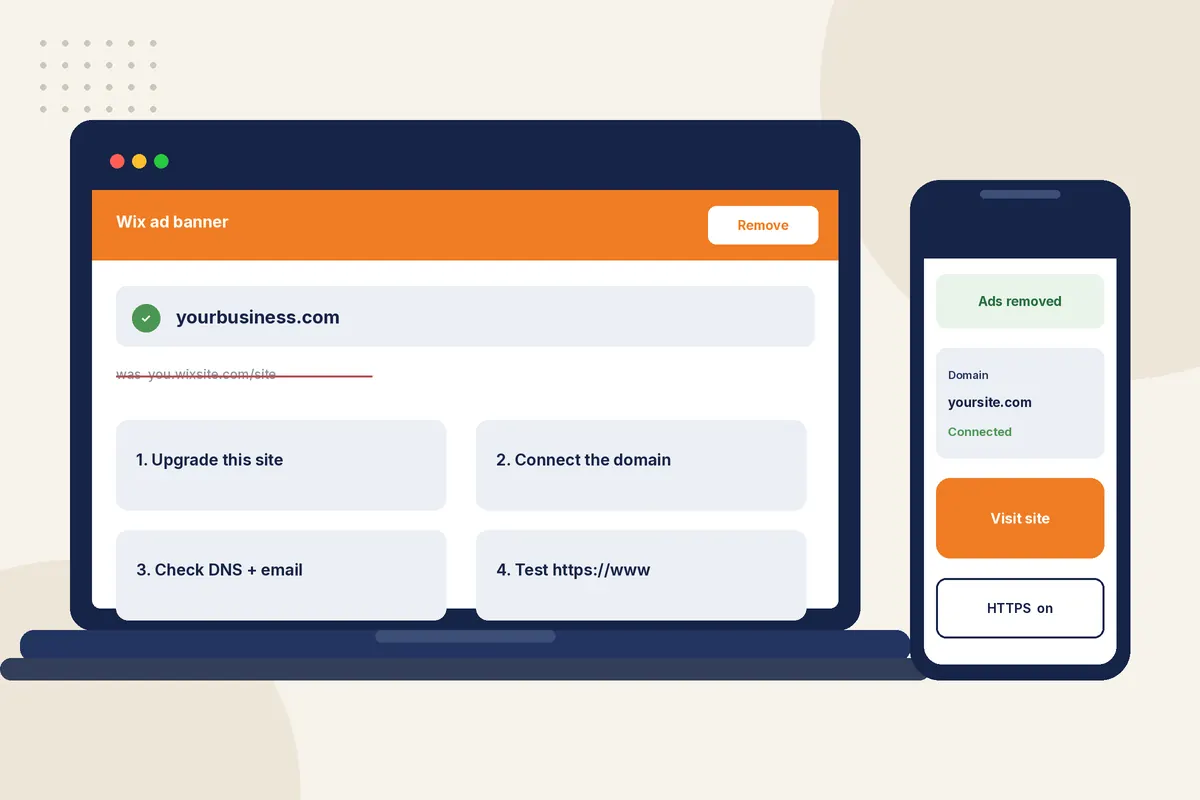
A free Wix site is a reasonable way to try a layout. It is a weaker way to look like an established business, because every page carries a Wix banner ad, the browser tab shows a Wix favicon, and the address is usually something like yoursite.wixsite.com/name. Customers notice. So do people comparing you with a competitor who already has their own domain.
To remove the Wix ads banner and connect a domain, you need two things that work together: a paid Wix site plan on that specific site, and a custom domain pointed at it. Upgrading alone does not change the web address. Connecting a domain on a free site is not enough either. This guide walks through both, using Wix's own help articles as the source of truth, and flags the mistakes that leave the banner up or the domain "not connected".
Why the banner is there, and what actually removes it
On a free site, Wix shows a banner ad at the top of the page and uses its own favicon. Wix's article on removing the Wix banner ad and favicon is blunt: those come off when you upgrade to a Premium plan that includes the feature. There is no hidden toggle on the free plan that removes the ad.
One exception is worth knowing. The "Proudly Created With Wix" line in the footer is ordinary text in the editor. You can edit or delete it without paying. That is not the same as the banner at the top, which is a platform ad.
A plan applies to one site. If you have two Wix sites, upgrading one leaves the ads on the other. If a plan expires, Wix's upgrade documentation says the site stays online but reverts to a free Wix URL, the custom domain is disconnected, and the ads return. Keep auto-renewal on, or put a reminder in the calendar before the renewal date.
Upgrade the site first
Choose the plan against what the site has to do, not just against the lowest monthly price. All current Wix site plans that Wix describes as Premium include a custom domain and removal of Wix branding, but they differ on storage, payment features and extras. Check the live comparison on Wix's upgrade page before you pay, because plan names and limits change.
In outline, the process is:
- Open the Upgrade page from your Wix account, making sure you are upgrading the correct site
- Select a plan and billing cycle, then complete checkout
- Wait for the plan to show as active on that site
Upgrading does not automatically attach a custom domain. If you only buy the plan and stop there, the ads should come off, but visitors may still reach you on a wixsite.com address until you connect a domain and start using it in your links, ads and directory listings.
Some yearly plans include a voucher for a new domain purchased through Wix, usually with a deadline and with limits (it typically cannot be used to renew a domain you already own). Read the voucher terms in your account before you assume the domain is free.
Connect a domain you already own, or buy one
You have two clean options.
Buy the domain through Wix. Wix then manages the DNS, and connecting it to the upgraded site is usually a matter of choosing the site in your account. This is the simplest path if you do not already have a domain and you are happy for Wix to be the registrar.
Connect a domain you already own at Google Domains' successors, GoDaddy, Namecheap, Cloudflare or another registrar. In your Wix account, add the existing domain and follow the on-screen instructions. Wix generally offers two methods:
- Nameservers (the method Wix recommends in most cases): you change the domain's nameservers at the registrar to the values Wix shows you. DNS is then managed in Wix.
- Pointing: you keep DNS at the registrar and create the A and CNAME records Wix asks for. This is often better if your email (Microsoft 365, Google Workspace, or mailbox hosting) already depends on MX and other records at the current provider, and you do not want to move them.
If you use nameservers, copy any existing email or verification records before you switch, or confirm that Wix will import them. A domain that starts loading the website but drops business email is a painful own-goal. If you use pointing, add exactly the records Wix shows, and do not leave an old A record pointing at a previous host.
Wix notes that some registrars can complete the connection automatically once you log in. Others need a manual nameserver or DNS change. Either way, allow time for DNS to propagate. It is often much faster, but it can take up to 48 hours.
After it is connected: the checks people skip
When Wix says the domain is connected, do this before you announce the new address:
- Open the bare domain and the www version. One should be your chosen canonical address, the other should redirect to it
- Confirm the site loads over HTTPS and the browser does not show a certificate warning
- Set a favicon in the Wix dashboard so the old Wix icon does not linger
- Click the contact form, click-to-call links and any booking or pay buttons
- Send a test email to an address on that domain if you use domain email, and test receiving as well as sending
- Update Google Business Profile, social profiles, ads, email signatures and any directories so they use the custom domain, not the wixsite.com URL
Search engines treat a move from a free Wix URL to your own domain as a change of address. Keep the old Wix site published on the plan while you can, and use Wix's options to connect the domain properly rather than running two unrelated sites. If you later leave Wix entirely, you will need a fresh redirect plan; that is a different project from connecting a domain on Wix itself.
If you see "domain not connected"
This usually means DNS is incomplete, pointed at the wrong place, or still propagating. Work through the obvious causes first:
- The site is not on a plan that allows a custom domain
- You connected the domain to a different site in the same Wix account
- Nameservers were typed with a typo, or only one of two nameservers was changed
- Pointing records still include an old host's A record
- Not enough time has passed since the DNS change
Check the live DNS with a lookup tool, compare it with the values Wix is asking for, and only change one thing at a time. If email broke at the same moment, restore the MX records before you do more experimentation.
When connecting the domain is not the real problem
Removing ads and putting the site on yourname.com makes a Wix site look finished. It does not automatically fix a slow homepage, a template that does not match the business, or an enquiry form that nobody checks. For some owners, the paid Wix plan is the right long-term home: they can edit the site themselves, and the domain is in place.
For others, this is the moment they notice the site is hard to structure, expensive to extend, or awkward to move. If you are already considering a rebuild on your own domain, our list of signs your website needs a redesign and the website redesign page are a better next read than another year of fighting a template. A new site should go live on the same custom domain, with redirects from any old paths you still care about.
Quick checklist
- Upgrade the correct Wix site, not a draft copy sitting in the same account
- Confirm the banner and Wix favicon are gone after the plan is active
- Connect an existing domain or buy one, then finish nameserver or pointing setup
- Protect email DNS if mail already uses that domain
- Test https:// and www, the form, and a real email
- Replace wixsite.com links wherever customers already find you
Frequently asked questions
Can I remove the Wix ads banner without paying?
No. The top banner and the Wix favicon are removed by upgrading to a plan that includes that feature. You can edit the footer credit without a plan, but that does not take the banner down.
Does buying a Wix plan automatically give me a custom domain?
No. The plan lets you connect or purchase a domain; you still have to do that step. Some yearly plans include a voucher for a new domain from Wix, with time limits, so read the voucher before it expires.
How long does it take for a connected domain to start working?
Sometimes minutes, sometimes a few hours. Wix and most registrars ask you to allow up to 48 hours for DNS changes to propagate everywhere. If nothing has changed after that, the records themselves are usually wrong, not "just slow".
Want a site on your own domain, without the platform ads?
Connecting a domain and removing the Wix ads banner is the right first upgrade if you are staying on Wix. If you would rather have a site designed around your services, with a domain you already own and a clear enquiry path, The Webinest builds fixed-price websites for small businesses and can help you plan a clean move. Get in touch with our team if you would like a straightforward view of the options.